From Theory to Production: Vertical vs Horizontal Scaling.
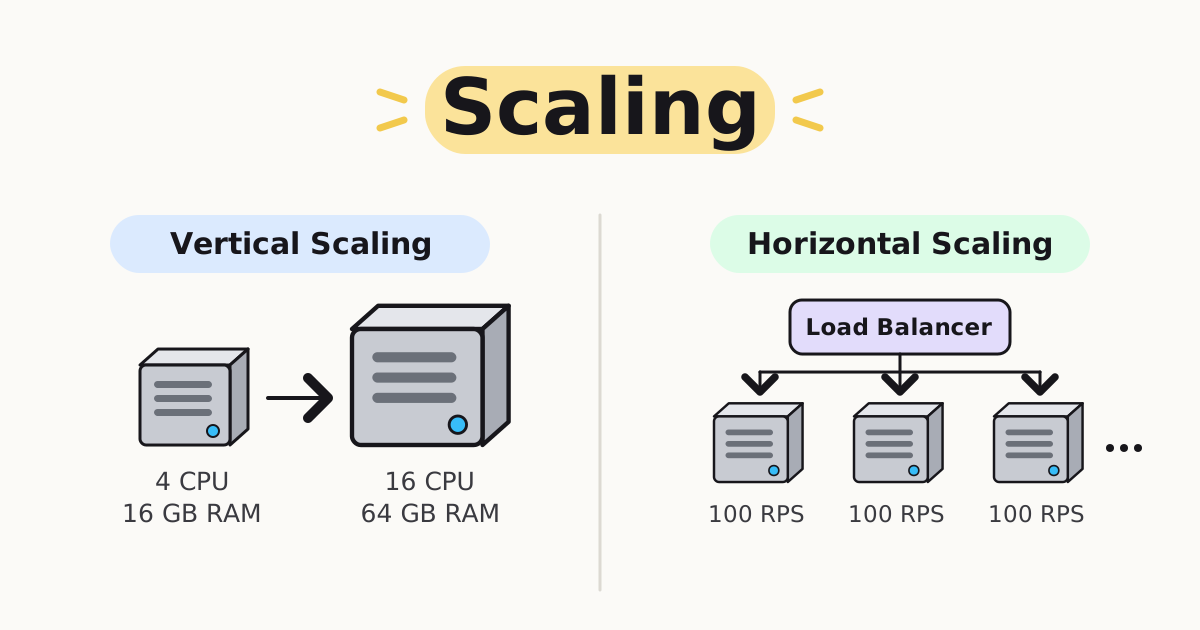
I've known scaling for a long time. Vertical scaling, horizontal scaling, concurrency. I've read about them, drawn the diagrams, and explained them in interviews:
- Vertical scaling → make the machine bigger.
- Horizontal scaling → add more machines.
- Concurrency → handle multiple things at the same time.
But I had never actually applied them to a real production system. Knowing the concepts and using them for something that has to handle real traffic turned out to be two very different experiences.
Today, while working with GCP, I had to put real numbers behind those concepts: instance capacity, requests per second, CPU and memory requirements, and how many instances would actually be needed to handle the expected load.
This post is about what changed when the theory met real configuration.
Putting real numbers on it
Let's say my application receives 1,000 requests per second.
After testing, I find that one instance can reliably handle 100 requests per second.
Ignoring redundancy and autoscaling for now, I need roughly:
1,000 / 100 = 10 instances
That's horizontal scaling. Instead of continuously making one machine more powerful, I distribute the workload across multiple instances.
But there's another option. Suppose I upgrade the instance to a machine that can handle 500 requests per second. Now I need only:
1,000 / 500 = 2 instances
That's vertical scaling: fewer, bigger machines.
The definitions were never the hard part. What was new today was making them drive real infrastructure decisions.
Vertical scaling
Vertical scaling means increasing the capacity of an existing machine.
Before:              After:
4 CPU                16 CPU
16 GB RAM            64 GB RAM
100 RPS              500 RPS
You are essentially saying: "This workload is fine on one machine. I just need a stronger machine."
It's simple and often useful, especially when an application isn't designed to run across multiple instances.
But there are limits:
- There is a ceiling. A machine can only get so large, and larger instances get disproportionately expensive.
- It's a single point of failure. If everything runs on one instance, your whole application goes down with it.
- You pay for peak all the time. A big machine costs the same at 3 AM as it does at peak hour.
Horizontal scaling
Horizontal scaling takes a different approach. Instead of making one machine bigger, we add more machines.
              Load Balancer
                   |
       +-----------+-----------+
       |           |           |
   Instance    Instance    Instance
   100 RPS     100 RPS     100 RPS
If each instance handles 100 RPS:
3 instances  → ~300 RPS
10 instances → ~1,000 RPS
Now capacity grows by adding instances. This is where concepts like load balancers, autoscaling, health checks, service discovery and stateless services start becoming important.
That last one matters more in practice than it looks on a diagram. If a user's session lives in one instance's memory, their next request might land on a different instance and the session is gone. So state has to move somewhere shared, like Redis or the database.
This is where scaling stops being just a "machine size" problem. It becomes a distributed systems problem.
Try both
Here are the two side by side. Switch between vertical and horizontal, push the traffic up, and then try taking a machine down. Watch what happens to the one big machine versus the group of small ones.
10 small instances share the 1,000 RPS behind a load balancer.
The math is never exactly 10
Earlier I said 1,000 / 100 = 10 instances. In practice, running every instance at 100% is asking for trouble. Traffic spikes, instances restart, deploys happen. You saw it above: take one instance down out of exactly 10, and some requests start failing.
So you add headroom, usually something like 20–30%:
10 instances × 1.3 ≈ 13 instances
And you keep at least 2 instances running at all times, so one failure doesn't take the whole service down.
This is the calculation I actually went through today. Change the numbers and see how it moves.
If traffic doubles tomorrow, you would need 26 instances.
Where concurrency fits
Scaling and concurrency are related, but they are not the same thing.
Suppose one server with 4 CPU and 16 GB RAM handles 100 requests per second. That doesn't mean it processes only one request at a time. It handles many concurrently:
Request A → waiting for DB
Request B → processing CPU work
Request C → waiting for an API
Request D → reading from cache
Request E → waiting on the network
While Request A is waiting on the database, the server can work on B, C, D or E. That's concurrency: making progress on multiple tasks during overlapping periods of time.
Here are those same five requests on a single CPU core. Press play, or drag the slider through time. Look at the two numbers at the bottom: how many requests are in flight, and how many are actually on the CPU.
Most of the time, several requests are in flight, but only one (or none) is actually using the CPU. The rest are just waiting. That is the difference between concurrency (how many things are in progress) and parallelism (how many things run at the exact same instant). With one core, parallelism is never more than 1, but concurrency can be 4 or 5.
Scaling is about increasing the system's total capacity to handle more work.
Where latency comes in
This is the part I felt most clearly once real numbers were involved. There's a simple formula for how many requests an instance is juggling at once:
requests in flight = requests per second × time per request
If one instance handles 100 RPS and each request takes 200 ms:
100 × 0.2 = 20 requests in flight
Now suppose the database gets slow and requests start taking 400 ms. If that instance can only juggle about 20 requests before it slows down, its throughput drops:
20 / 0.4 = 50 RPS per instance
1,000 / 50 = 20 instances
Same users. Same traffic. Twice the instances, just because each request got slower.
Try it. The traffic is fixed at 1,000 RPS. Only the time per request changes.
This is the baseline. Now drag the latency and watch the count.
I knew this formula already. But watching it change a real instance count is what made it stick: concurrency, latency and scaling are all part of the same conversation. A slow dependency can force you to scale just as much as a traffic spike.
A simple mental model
The way I think about it now:
- Concurrency: How many things can my system work on at the same time?
- Parallelism: How many things can actually execute at the same instant?
- Vertical scaling: How much more powerful can I make one machine?
- Horizontal scaling: How many machines can I use to distribute the workload?
These are easy to blur together when you only discuss them. They get much sharper when you have to calculate actual capacity for a real system.
What production adds
The definitions didn't change. What production added was this chain:
Expected traffic
      ↓
Requests per second
      ↓
Capacity per instance
      ↓
Required instances (+ headroom)
      ↓
CPU / memory requirements
      ↓
Instance type
      ↓
Cost
      ↓
Scaling strategy
Instead of saying "we'll horizontally scale the application," you start asking:
- How many requests per second are we expecting?
- How many requests can one instance reliably handle?
- What happens at 2x the expected traffic?
- What happens if requests get slower?
- Do we scale on CPU, memory, RPS, latency or queue depth?
- What happens if one instance dies?
Those questions are much closer to real engineering.
Theory vs production
Scaling is one of those topics where knowing it and doing it are different experiences.
Reading "vertical scaling means increasing the resources of a machine" is easy.
Actually configuring an instance, estimating traffic, calculating capacity, thinking about RPS and latency, and deciding whether you need one larger instance or several smaller ones is where the concept becomes real.
Today, scaling stopped being a system design diagram and became a calculation for a real system.
That's the difference between knowing a concept and having applied it, and today I got to cross that line.
Stay in the loop.
Receive technical deep-dives and architectural insights directly in your inbox.
NO_SPAM // NO_TRACKING // 0_COST